
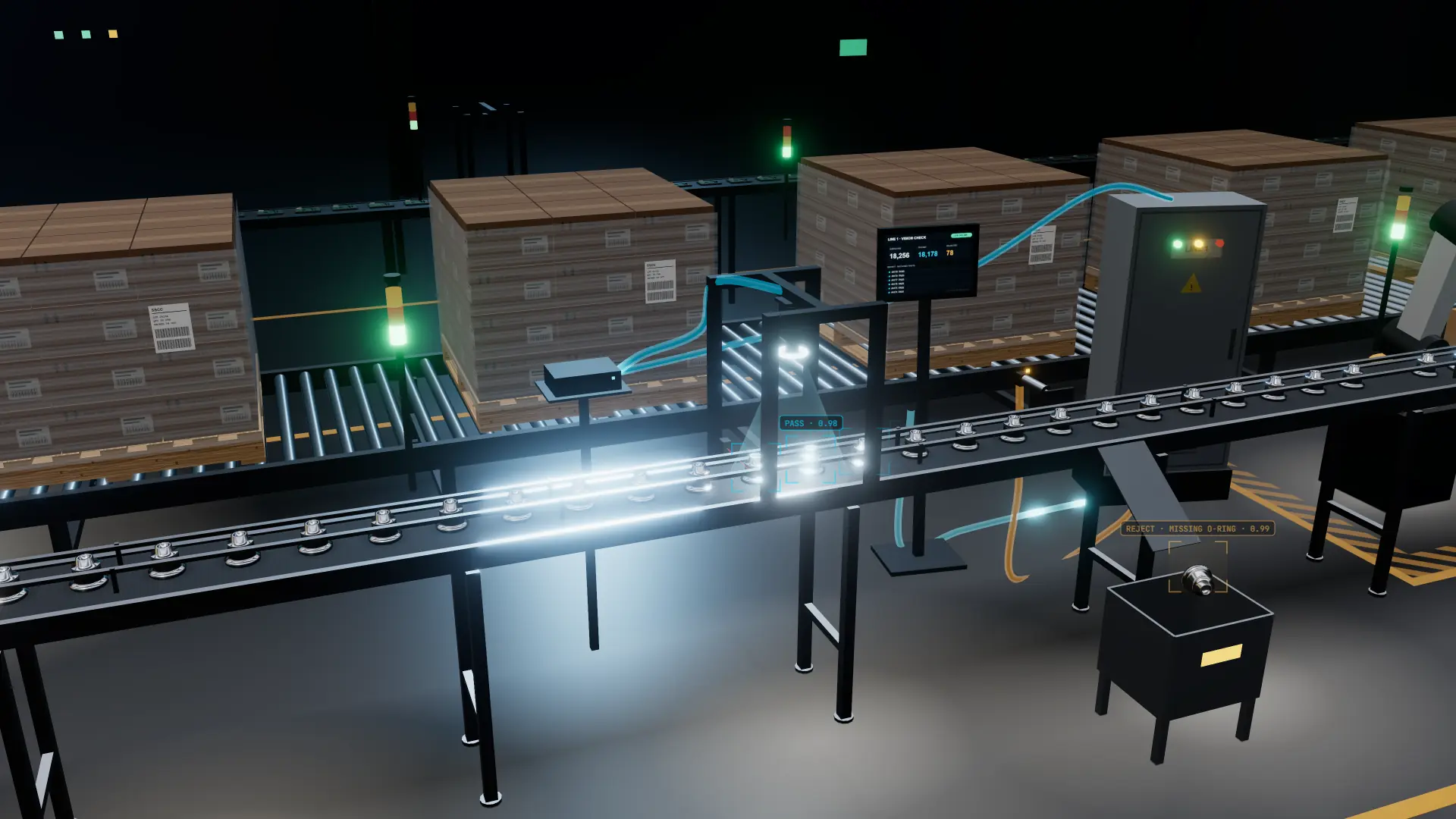
AI vision that fits into the plant you already run.
No rip-and-replace. The cameras and AI work with your line, its equipment and controls, and the screens and reports your team already uses, so faults are caught and acted on without changing how the plant runs.
Updated October 2026 · 3D simulation, illustrativeIn short: Plant integration is the part of an AI vision system that connects it to the plant you already run. We place the cameras to suit your line, run the AI on a PC on site, and send each result to your line’s own controls, which reject, divert, stop or flag the item using the equipment you already trust. Results also reach the operator screens and shift reports your people already use. One Australian team handles both the AI and the integration.
- No rip-and-replace: works with your line as it is
- Your plant stays in charge: the AI informs, your controls decide
- Watch-only first: nothing acts until you’ve seen it work
- Runs on site, even when the internet drops
- One team for the AI and the integration
Fits your line, not the other way round.
Most vision projects ask the plant to adapt to the camera. We start from the other end: your products, your line speeds, your changeovers and the faults that actually cost you, and we design the system to suit them.
Cameras where they work
Camera and lighting go where your line suits them: where items are spaced and steady, clear of guarding and wash-down, and out of the way of maintenance access.
Your speeds and spacing
Set up for how product really moves on your conveyor, including the odd item that arrives crooked, touching its neighbour or late.
Your changeovers
When the line switches products, the system switches to the right settings for what’s running. A changeover doesn’t need a call to us.
A small footprint
A camera mount on the line and a PC in a cabinet nearby. Nothing that blocks cleaning, guarding or the operator’s view.
Connected to the equipment you already trust.
A vision system is only useful if its results reach the people and machines that act on them. This is where each result goes, and what changes for the gear you already run.
Line equipment & controls
Each result goes to your line’s controls as a simple pass, fail or check signal. Your existing logic decides what happens next, the same way it handles any other sensor on the line.
Reject & divert gear
Air jets, pushers, diverters and reject bins you already run are fired by your line, not by the AI. If a line has no reject point yet, we’ll tell you plainly what it would need.
Operator screens
Pass and fail counts, and the reason for each reject, can appear on the screens operators already watch, or on a simple screen beside the line.
Alarms & alerts
A light, a horn or a message to the shift lead when reject rates climb, so a problem upstream, like a drifting filler or a fresh roll of labels, is caught early.
Reports & quality records
Plain-language shift reports, plus every item’s result saved with its photo and time, ready for your quality records or the systems your quality team already uses.
Already running a rule-based vision system? AI vision can sit alongside it and take the checks it struggles with, rather than replacing it. Computer vision vs machine vision.
It reports what it sees. Your line decides.
The AI never takes control of your line. For every item it returns a result, a reason and a confidence score. Your existing setup decides what happens next, exactly as it does today for a jammed sensor or a low-level alarm.
The item leaves the line at your reject point. Typical for clear faults like a missing hole or a wrong label.
The item goes to a recheck lane or hold area for a person to look at. Useful for borderline or uncertain items.
The line pauses for something serious, such as a run of wrong labels after a changeover.
Nothing happens on the line. The result is logged and shown to the operator, which is how watch-only mode works.
Which action applies to which fault is agreed with your production and quality teams during setup, and written down at handover, along with what the line does if the vision system ever stops sending results.
The AI informs. Your plant decides. How your line is controlled doesn’t have to change.
Proven on your line before it acts on it.
Integration happens in stages, and each step forward is your call. Nothing is wired to act on a running line until your team has watched it work on your own product.
- 01
Tested offline
The AI is trained on photos of your product and tested on your own footage before it goes near the line.
Nothing connected - 02
Watch-only
It runs on the line and reports what it would reject, but sends nothing to your equipment.
You review the results - 03
Live on the line
Once you’ve seen it work, results go to your line’s controls and faulty items are acted on.
When you say so
- Watch-only, side by side: during watch-only, your team compares what the AI would have rejected with what they found themselves.
- Set-up checks documented: camera position, lighting, trigger timing, the signal to your line and what each result means, all written down at handover.
- Always a way back: you can return to watch-only at any time, and every new model is tested on your photos before it replaces the old one.
The right view for every role.
The same results, shown the way each person needs them.
- OPS
Operators
Plain screens: pass and fail counts, the last few rejects with their photos, and a clear prompt when something needs a look.
- ENG
Maintenance and controls
Engineering views for camera health, trigger timing, signal status and diagnostics, so faults are found quickly.
- MGR
Managers
Shift reports in plain language: what ran, what failed, why, and what changed, ready for the morning meeting.
- QA
Quality
Every item’s result saved with its photo and time, so any item on any shift can be looked up and shown.
On site, offline-tolerant, easy to support.
A production line can’t wait on a cloud server. The AI runs on a PC in your plant, makes its decisions locally and keeps going if the internet drops. Your footage stays on your premises.
AI on a PC in your plant
- Decisions made in the plant, at line speed
- Keeps working if the internet drops
- Footage stays on your premises
- No per-image cloud fees
Images sent off site
- Every decision waits on a network round trip
- Stops when the connection does
- Footage leaves the plant
- Usage-based costs as volume grows
Keeps working offline
Checking items and signalling the line happen in the plant, with no round trip to the internet.
Built-in diagnostics
Set-up checks for camera, lighting, trigger and signal, so a fault is a quick look rather than a call-out.
Footage stays on site
Images and results stay in your plant by default. Remote support only happens where you allow it.
The AI and the integration, under one roof.
Vision projects often stall in the gap between a vision vendor and an integrator: one owns the model, the other owns the connection to the line, and nobody owns the result. We handle both sides, so there’s one team accountable for faults being caught and acted on.
- Camera and lighting chosen for the job
- Training on your product and your real faults
- Offline testing on your own footage
- Model updates, with a one-step way back
- Mounting, triggering and timing on the line
- The signal to your line’s controls
- Reject, divert, stop and flag behaviour
- Operator screens, shift reports, documented handover
- A contact who knows the line
- Access at agreed times, around production
- Examples of good product and real faults
- Agreement on what counts as a reject
More information. Same plant.
- How your line is controlled and who decides
- The reject and divert equipment you already run
- Your operators’ routine and their screens
- Your quality team’s sign-off and standards
- Every item is checked, not a sample
- Every reject comes with a reason and a photo
- Every shift ends with a report nobody had to write
- Problems upstream show up as trends, early
Where plant integration applies
Every production line inspection system we build is integrated this way, whatever it checks. On a food and beverage line that might mean an unsealed tray diverted before it is boxed. On a packaging line, a pallet with torn wrap held back before it ships. In general manufacturing, a part with a missing fastener held for rework. The checks change from plant to plant; the principle that your plant stays in charge doesn’t.
Industry 4.0, without the overhaul
Smart factory projects often start with a big platform and a long list of changes. Vision system integration can be a smaller, practical step: one line, one set of checks, results flowing into the systems you already have, and a record for every item. If it proves itself, it extends to the next line. If your existing cameras can do part of the job, we’ll say so. Adding AI to existing cameras.
Building the business case
An AI reject system earns its keep by catching faults that sampling misses and by giving you evidence for every item. To weigh that up for your plant, start with the real cost of manual inspection and how to build a vision inspection business case. Then book a free line assessment and we’ll tell you plainly whether it fits.
Plant integration, answered
The questions plant managers, maintenance leads and controls engineers ask before anything goes near their line.
Will AI vision slow our line down?
Do we need to change how our line is controlled?
What happens when the AI isn’t sure about an item?
Can it run without the internet?
What does our maintenance or controls team need to do?
Who looks after it once it’s running?
Related pages and guides
See how it would fit your line.
A free line assessment: we look at your line, its controls, its reject points and the screens your team uses, then show you where AI vision would connect and what would stay exactly as it is.